Event Compliance Management
Event Workforce Control
Built For Events
Plan, deploy and manage your stewards in real time without spreadsheets, rota tools or disconnected systems. SafetyDocs Shifts is a standalone operational platform designed specifically for live event delivery.
Number 1
Platform for planning, deployment and live control
0%
Per-user charges or growth penalties
100%
Built around real event workflows
SafetyDocs Shifts is built specifically for the realities of live events — where staffing, compliance, deployment and event-day control all need to work together. This is not generic workforce management repackaged for events. It is event workforce control from the ground up.
All Stewards & Approvals
Maintain a clear steward database, approval workflows and key personnel visibility across all your events.
All Stewards & Approvals
Maintain a clear steward database, approval workflows and key personnel visibility across all your events.
Shift Allocations
Assign people quickly, avoid confusion and keep scheduling tied directly to the live event plan.
Training & Compliance
Track certificates, qualifications, competencies and expiry-sensitive records without separate spreadsheets.
Check-in & Live Headcount
Know who is on site, where the gaps are and what the current operational picture looks like in real time.
Equipment Tracking
Manage radios, tabards, badges and related operational assets alongside the people using them.
The real cost: It's not just admin time. When an incident occurs, the HSE, the SIA or your insurer will ask: "Who was on duty? Where were they positioned? What qualifications did they have? Were they actually on site at that time?" Inboxes and spreadsheets won't cut it.
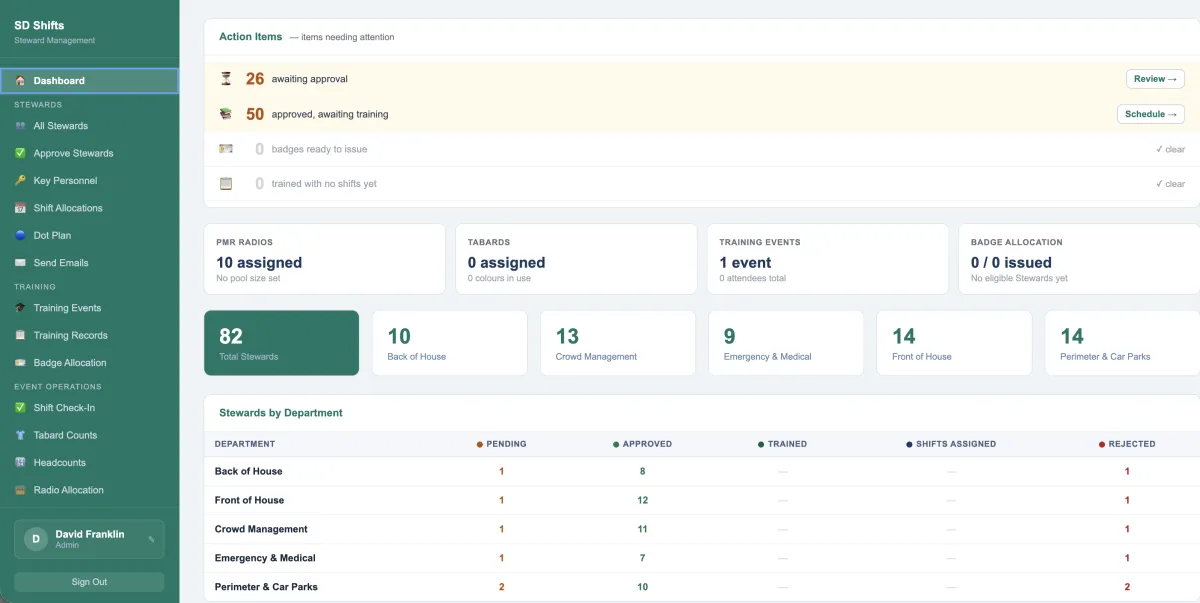
Dashboard
The dashboard gives you an instant overview of your entire stewarding operation. From approvals and training gaps to shift allocation and equipment readiness, everything is surfaced in one place so you can quickly identify risks and take action before they become problems.
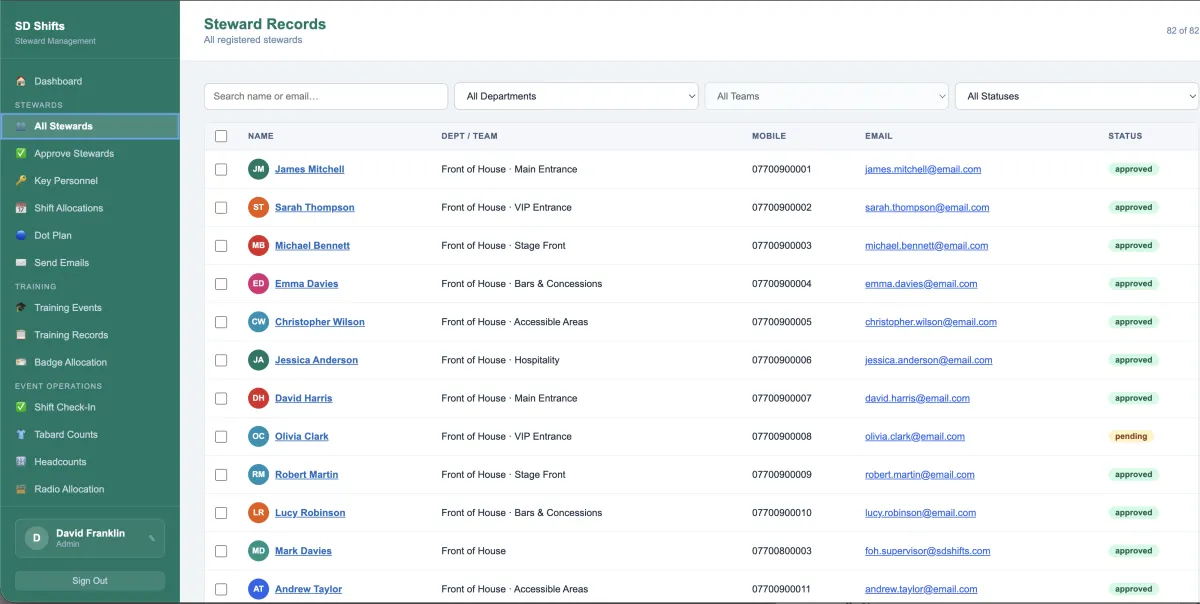
All Stewards
Maintain a complete, searchable record of every steward across your events. Instantly view roles, departments, status and contact details, ensuring you always have full visibility of your workforce and can deploy the right people where they’re needed.
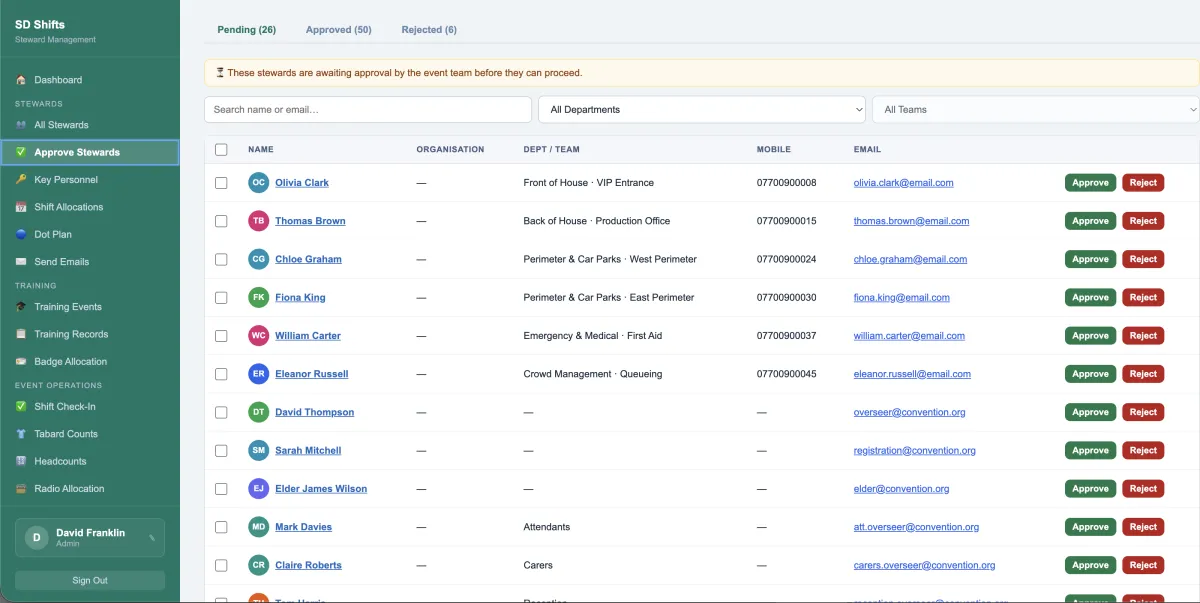
Approve Stewards
Control who enters your operation with a structured approval process. Review new stewards, verify their details and ensure only authorised personnel are assigned to roles, reducing risk and maintaining operational standards.
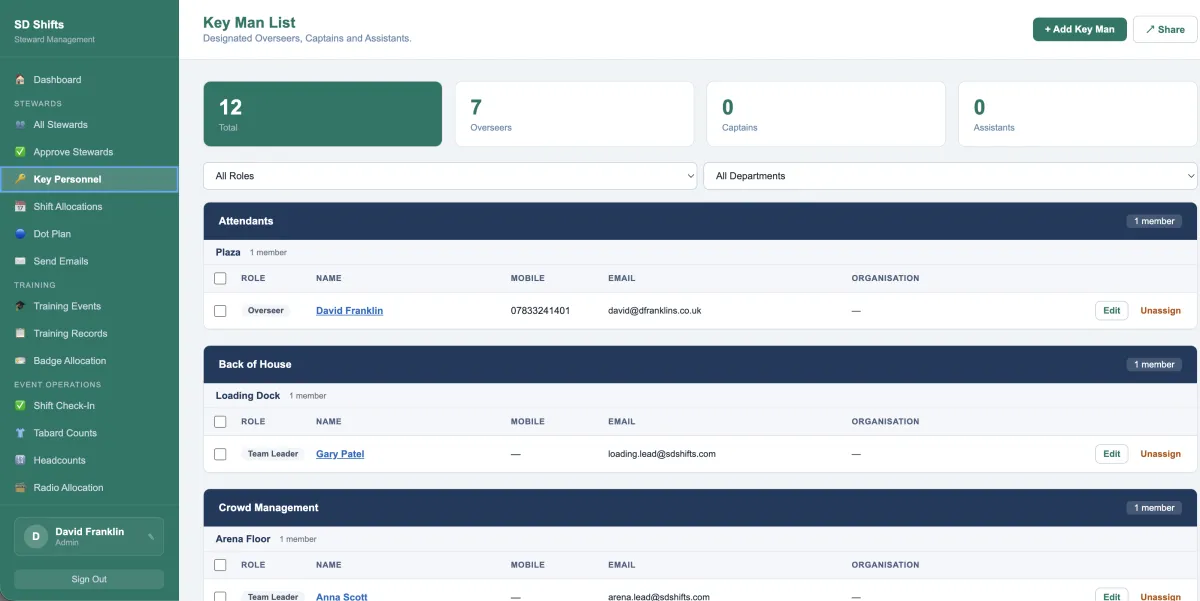
Key Personnel
Clearly define your leadership structure with designated overseers, team leaders and key roles. This ensures accountability across departments and gives you confidence that every area of your event is properly managed.
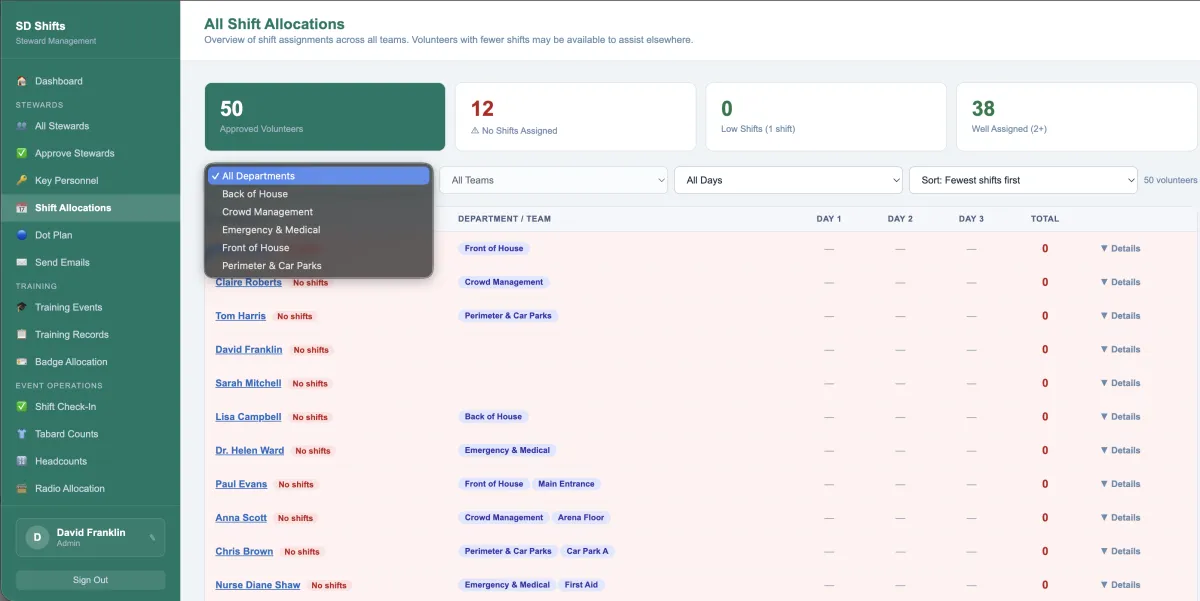
Shift Allocations
Allocate shifts across all departments with full visibility of who is assigned, under-utilised or missing. This allows you to balance workloads, prevent gaps and optimise your workforce across multiple days and event phases.
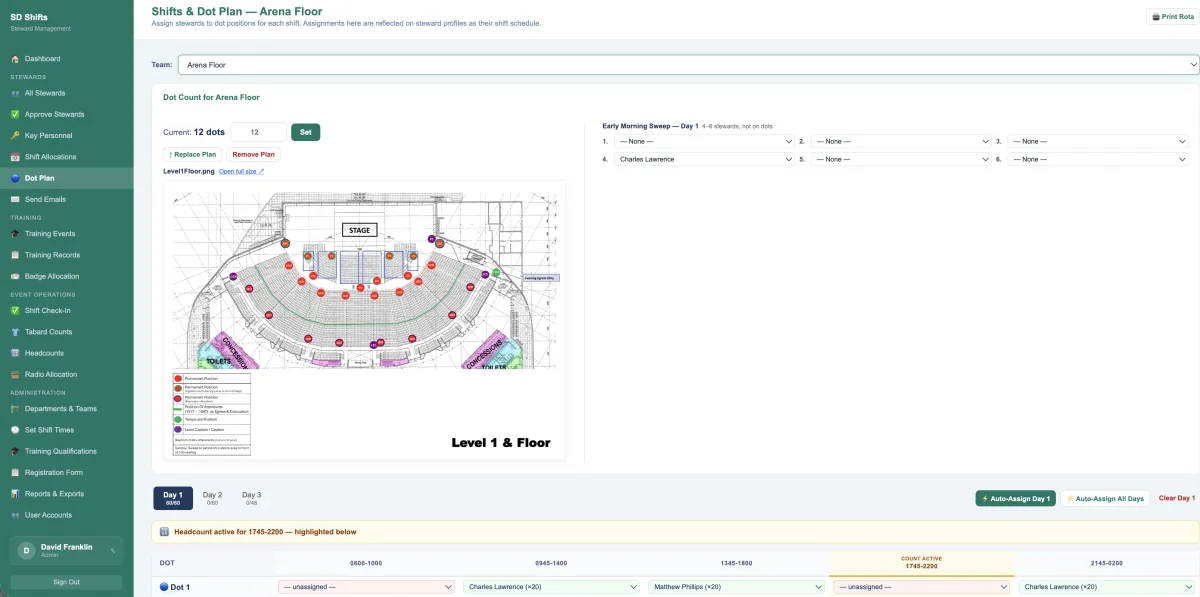
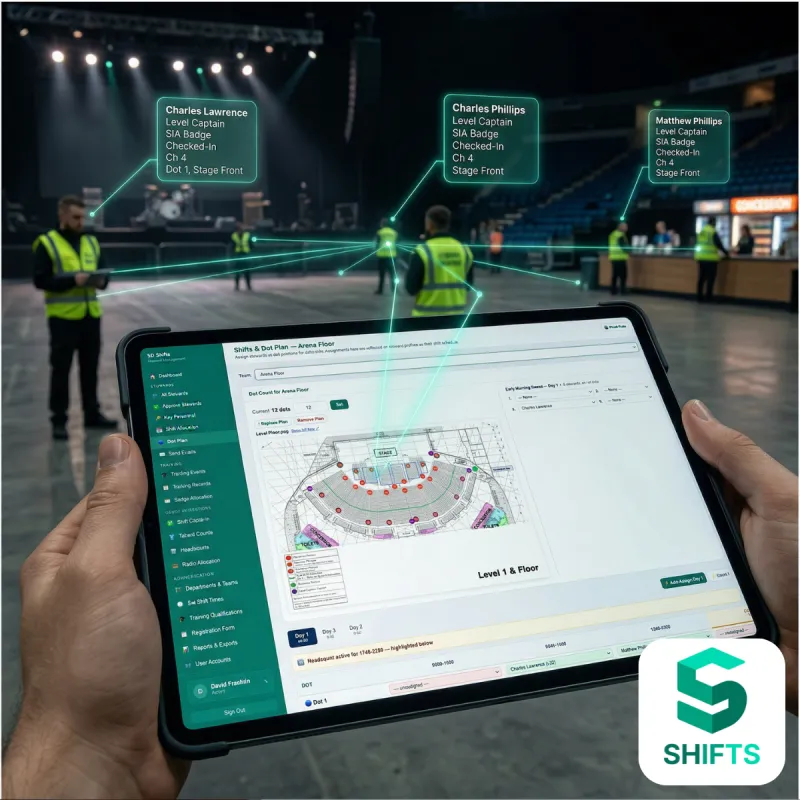
Dot Plan
Visually map steward deployment across your venue using dot plans. Assign staff directly to positions and shifts, ensuring your operational plan is clear, structured and easy to manage in real time. Auto scheduler.
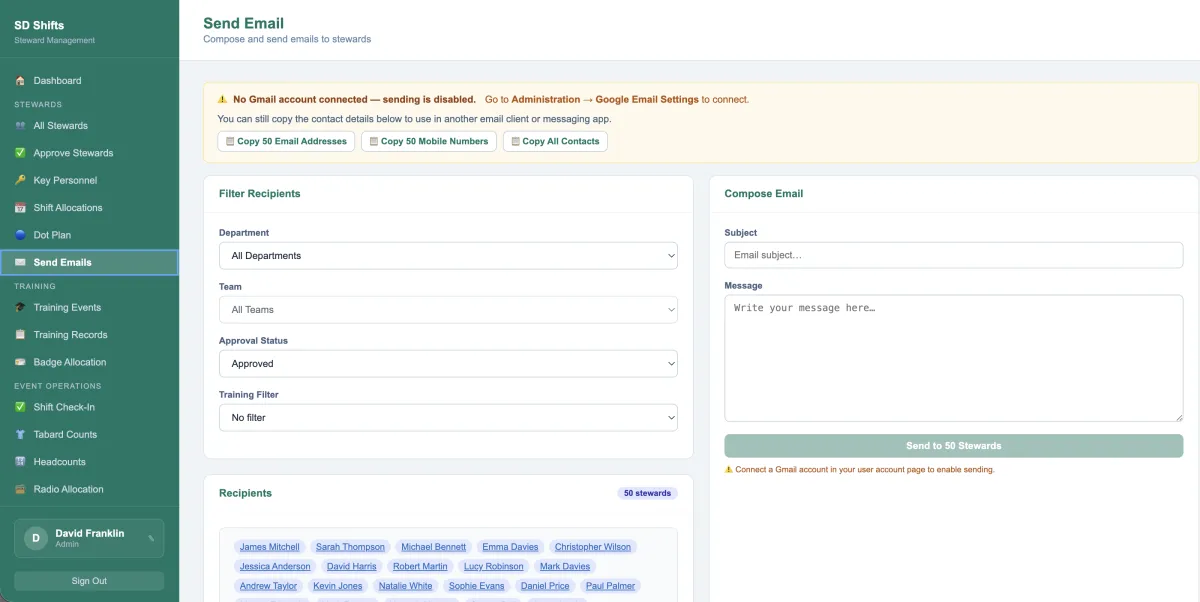
Send Emails
Communicate with your entire workforce or specific groups instantly. Filter by department, approval status or training and send targeted messages without exporting lists or relying on external tools.
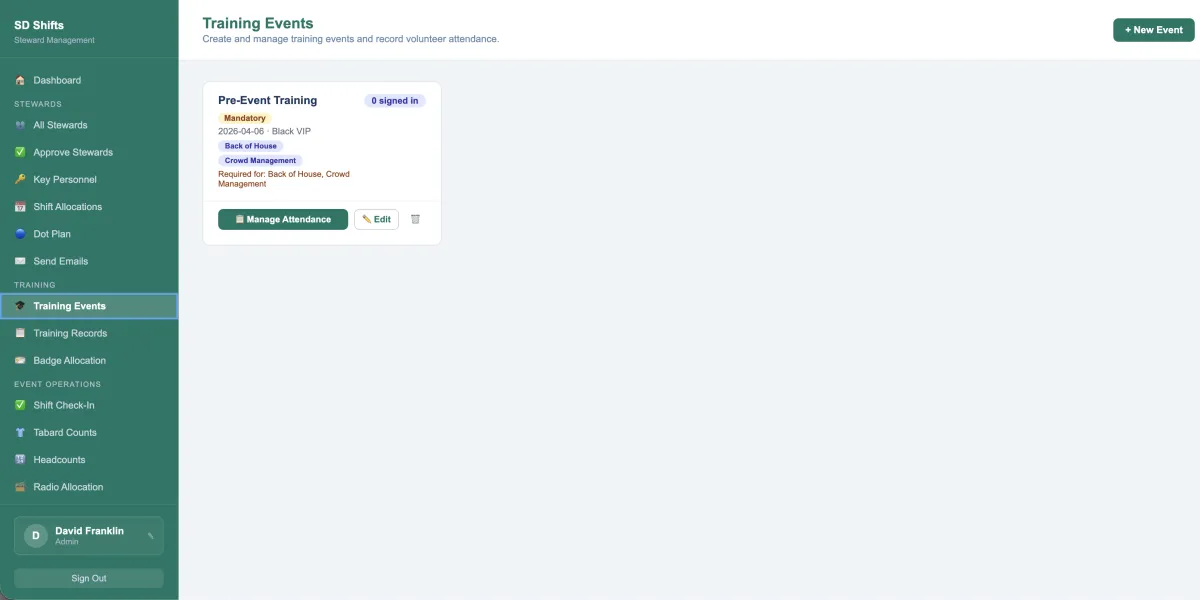
Training Events
Plan and manage steward training sessions before your event. Track attendance and ensure the right people are prepared for their roles, reducing last-minute issues and improving operational readiness.
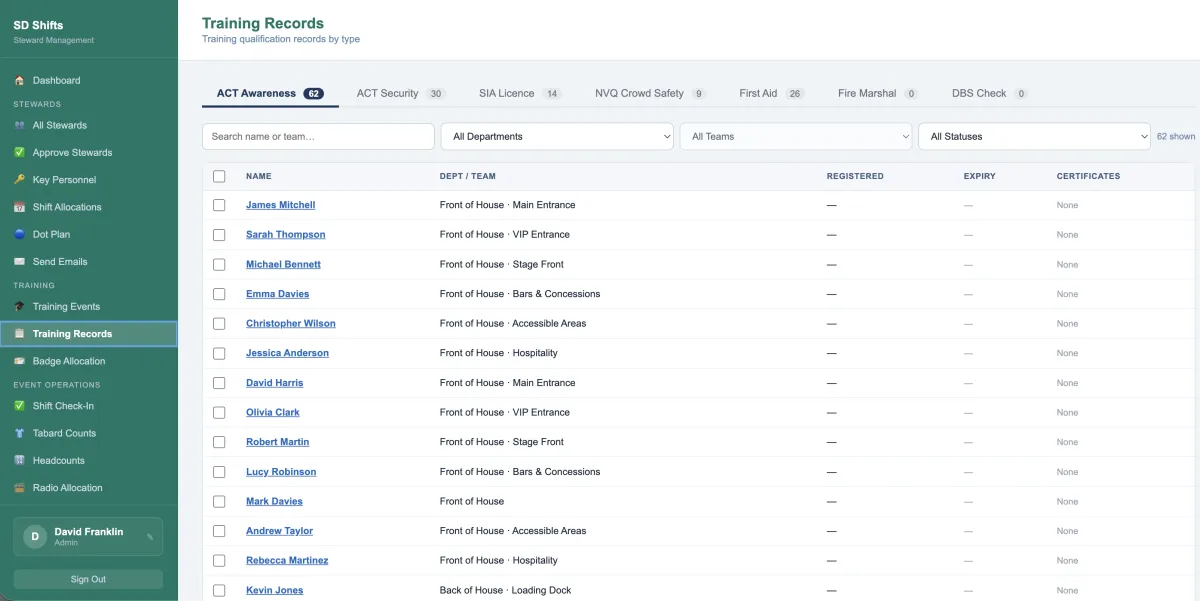
Training Records
Keep a complete record of all steward qualifications and certifications. Filter by type, track expiry and ensure every role is filled by appropriately trained personnel.
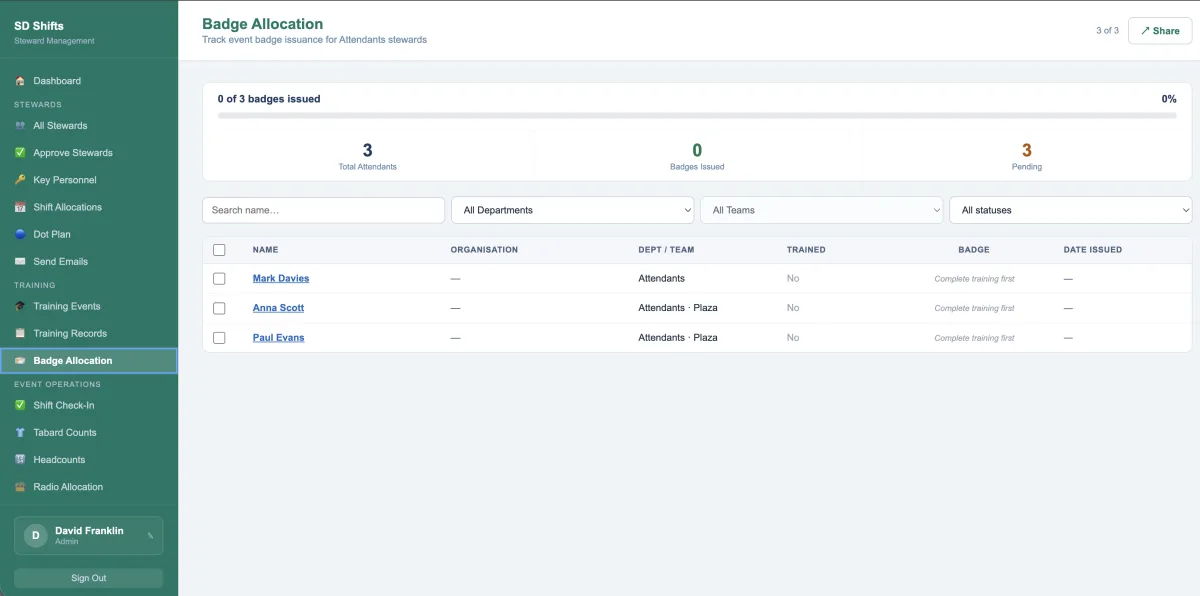
Badge Allocation
Track badge issuance and ensure only authorised, trained stewards are deployed. This provides an additional layer of control and accountability across your event workforce.
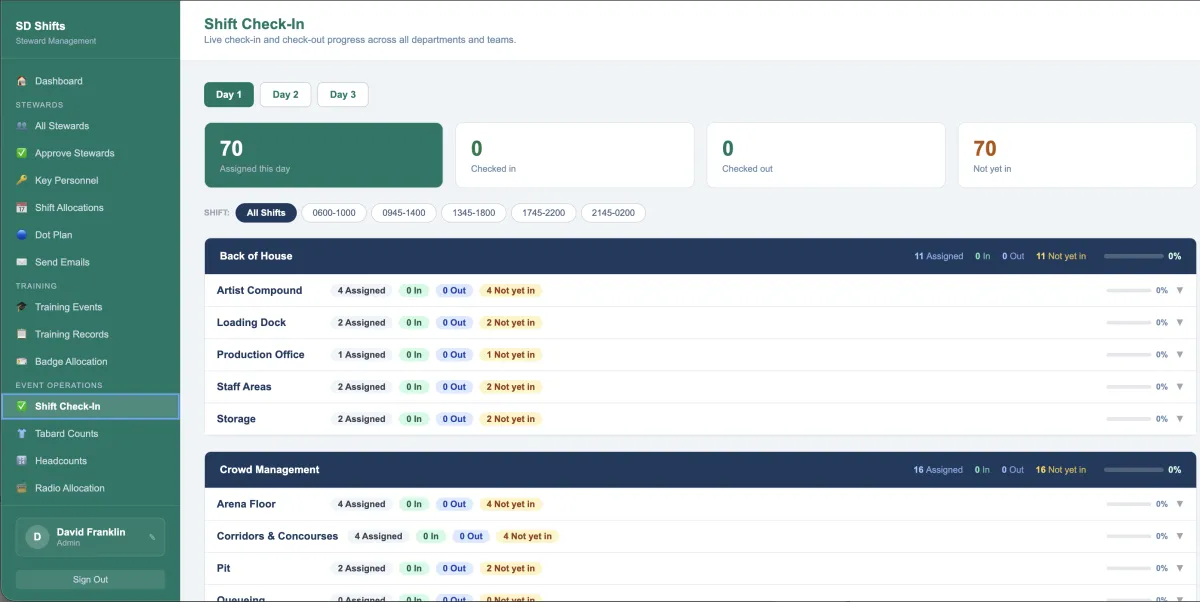
Shift Check-In
Monitor live check-ins and check-outs across all teams and departments. Instantly see who is on site, who is missing and where gaps exist, giving you real-time operational control.
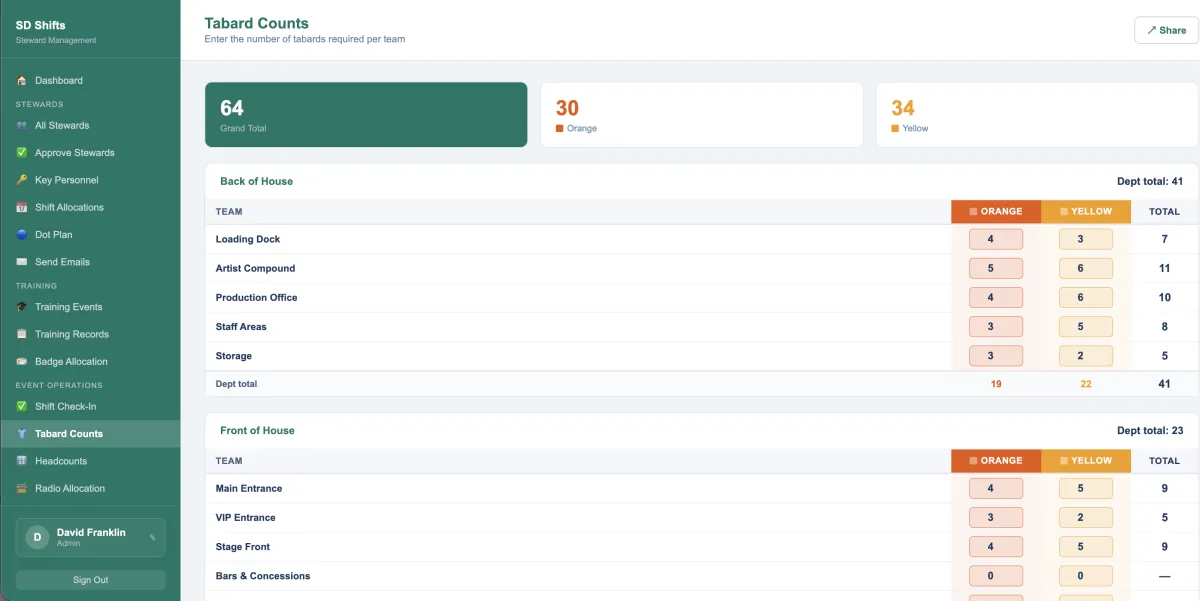
Tabard Counts
Plan and manage tabard distribution across departments and teams. Ensure the correct quantities are available and allocated, avoiding shortages or confusion on the day.
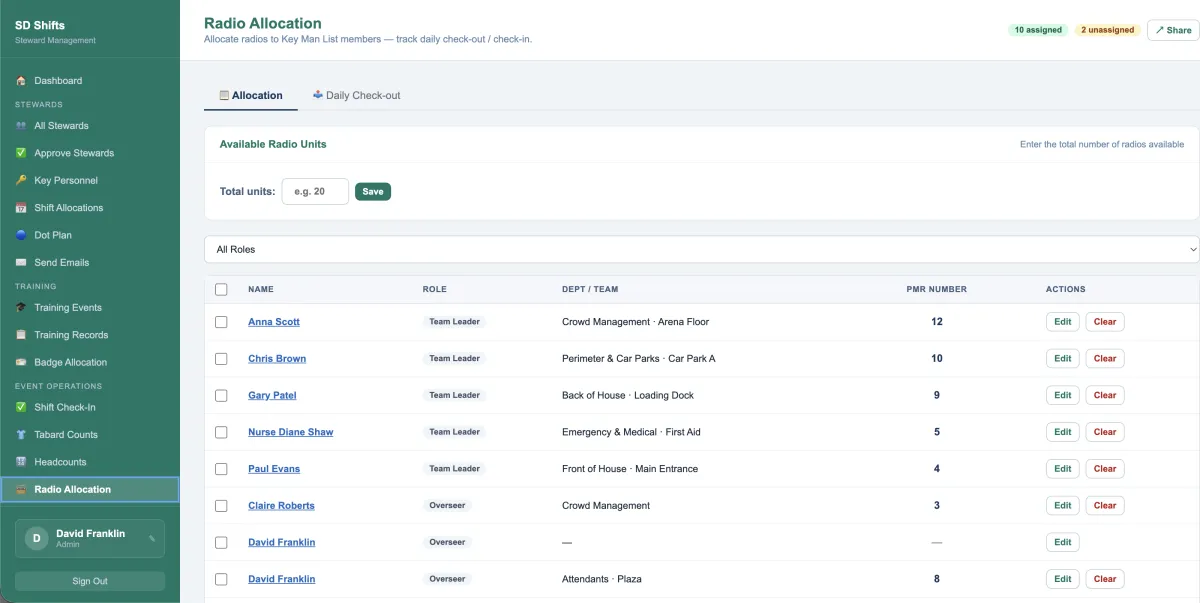
Radio Allocation
Allocate radios to key personnel and track daily check-in and check-out. Maintain control of critical communication equipment and ensure it is always in the right hands.
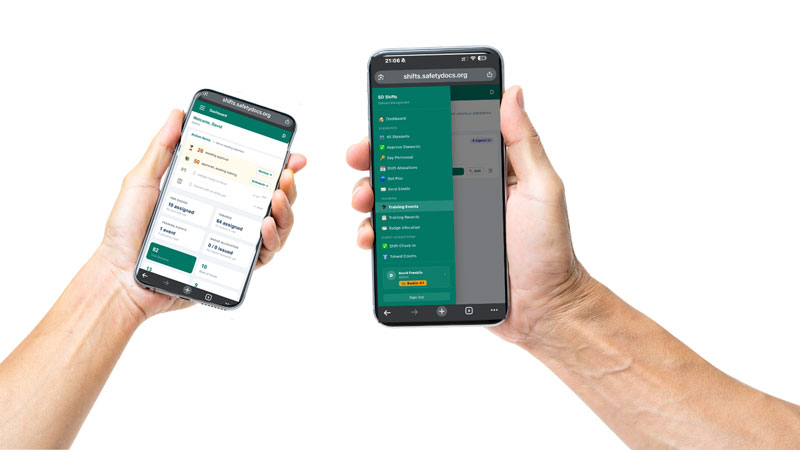
Mobile App
The mobile app puts your entire stewarding operation in the hands of your on-site team, with instant access to shifts, roles, and live event updates.
| Feature | SafetyDocs Shifts | Rota Software | Staffing Apps |
|---|---|---|---|
| Built specifically for events | ✓ | ✕ | Partial |
| Multi-event workforce control | ✓ | ✕ | Partial |
| Dot plan deployment mapping | ✓ | ✕ | ✕ |
| Certification tracking | ✓ | ✕ | Partial |
| Training management | ✓ | ✕ | Partial |
| Live event control | ✓ | ✕ | ✕ |
| SafetyDocs ecosystem alignment | ✓ | ✕ | ✕ |
| Unlimited users and staff | ✓ | ✕ | ✕ |
PROBLEM - How most venues handle it today
No visibility of where staff are, when they start, or what role they are covering
Shift planning handled manually across spreadsheets, messages, or paper rotas
No automatic scheduling, so managers waste time building rotas by hand
Qualifications, training, and competency checks are not linked to shift allocation
No instant view of who has a PMR, badge, or the correct hi-vis colour
Check-in and check-out are harder to track accurately in real time
Equipment allocation is managed separately, creating confusion and delays
If something goes wrong, proving who was where, when, and with what equipment becomes difficult
SOLUTION - How SafetyDocs SHIFTS handles it
Real-time visibility of staff, roles and locations
Easy approval or rejection tabs
Print or export final shift rotas
Centralised shift planning in one system
Dotplan visibility for all the team
Automatic scheduling option reduces admin work
Qualifications linked to shift allocation
Instant view of PMRs, badges and hi-vis
Live check-in and check-out tracking
Equipment tracked alongside staff
Full audit trail of staff, roles and activity
Begin Now...
Event Workforce Control — All in One Platform
£279.00 / month
Quantity
How It Works
Two sides. One system. Automation with a human in the loop.
SafetyDocs ECM works for both sides of the process. It guides contractors to submit accurate documents the first time, then automates the venue's review, approval and access pipeline with your team making the decisions that matter.
Platform Capabilities
Built for the reality of Event Compliance Management
SafetyDocs ECM isn't a generic document store.
It's an event compliance management system designed for the specific challenge of collecting,
verifying and approving contractor safety documentation at scale.
Automated Pipelines
Visual pipeline stages that move automatically as documents are received, reviewed and approved. Every event's compliance status visible at a glance.
Branded Contractor Portal
Your contractors log in to your branded portal to upload documents, view requirements and track their own approval status. No email. No confusion.
Mobile Ready
Access contractor statuses, review documents and manage approvals from any device. Live sync means your on-site team always has the latest information.
Smart Notifications
Automated email and SMS at every stage document requests, reminders, approvals, rejections and escalations. All configurable to your timelines.
Compliance Dashboard
See which events are compliant, which contractors are outstanding and where your team needs to focus. Real-time. Always accurate. One view.
Secure Document Storage
All documents stored with access controls, version tracking and expiry alerts. Full audit trail for every file who uploaded it, who approved it and when.
Workflow Automation
Stage change triggers, conditional logic and automated actions eliminate repetitive admin. Set up once runs for every event.
Multi-Venue Ready
Manage contractor compliance across multiple venues, event types and teams from one account. Each venue has its own requirements and approval workflows.
RAMS Preparation Guidance
Built-in guidance helps contractors prepare accurate risk assessments and method statements, reducing revision requests and getting documents right the first time.
Regulatory Compliance
Martyn's Law is here. Contractor compliance is part of it.
The Terrorism (Protection of Premises) Act 2025 requires venues to demonstrate documented compliance with counter terrorism measures including who has access to your premises and what checks were carried out. SafetyDocs ECM gives you that evidence automatically.
The Terrorism (Protection of Premises) Act 2025 becomes law. 24-month implementation period begins.
Venues expected to begin preparing procedures, documentation and contractor compliance frameworks.
All qualifying premises must have documented procedures, protection measures and evidence of compliance.
The SIA can assess compliance at any time. You need a system that maintains a complete, auditable record.
How ECM supports Martyn's Law
Documented contractor vetting and approval procedures
Evidence of who was granted venue access and when
Counter terrorism briefing confirmation tracking
Full audit trail ready for SIA assessment
Automated contractor security briefing delivery
Real time compliance dashboard
Evidence of active, ongoing safety management
Stop chasing contractor documents.
Start automating.
See how SafetyDocs ECM takes contractor document management from an impossible manual task to an automated pipeline with your team in control where it counts.

Assistance Hours
Mon – Fri 8-6
Sat - Sun 9-5
SafetyDocs Ltd 483 Green Lanes, London, N13 4BS